React.jsRedux ToolkitMaterial UIFirebaseExpress.jsMongoDB
NoteGem
Full-stack personal note-taking application featuring rich text editing, debounced auto-saving, Google OAuth authentication, and document persistence.
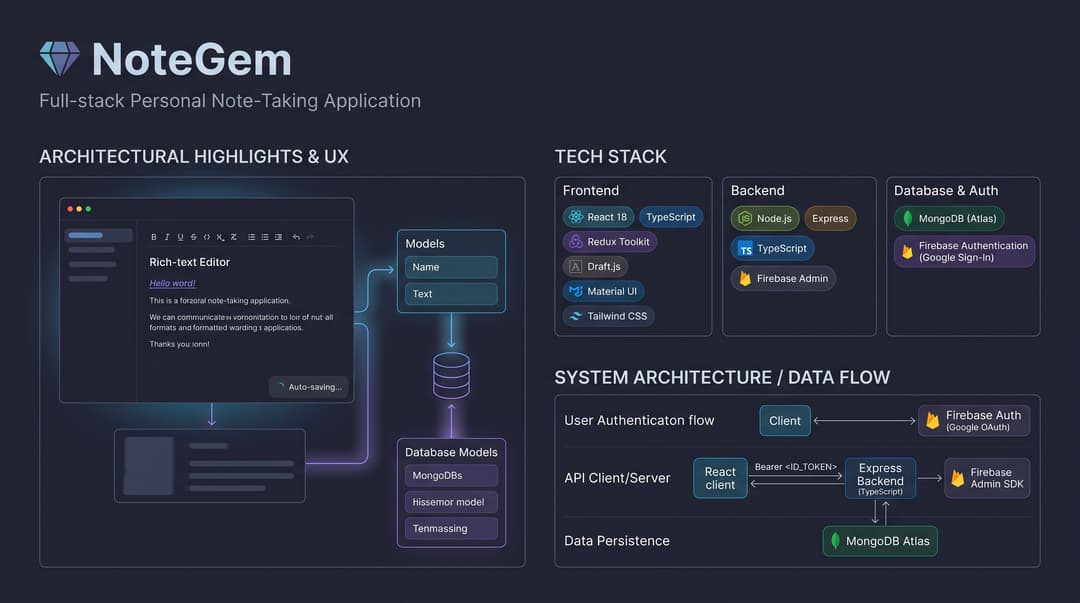
Architectural Highlights
- Rich Text Serialization: Uses Draft.js to handle custom inline styles, block level formats, and alignment. Editor states are serialized to raw ContentState JSON for structured storage in MongoDB.
- Debounced Auto-Save: Background sync pipeline monitors editor delta changes and dispatches debounced persistence requests to minimize backend write volume while preventing data loss.
- Token-Based Authentication Flow: Client signs in via Firebase Google OAuth. Subsequent API requests pass ID tokens as Bearer authorization headers, verified server-side using the Firebase Admin SDK before querying user-scoped Mongoose models.
- Predictable State Management: Redux Toolkit manages global client state across authentication, active note staging, and recent note caches.
- Type-Safe Backend: Express REST API written entirely in TypeScript with route validation powered by
express-validator.
Tech Stack
| Domain | Technologies |
|---|---|
| Frontend | React 18, TypeScript, Redux Toolkit, React Router DOM, Draft.js, Material UI, Tailwind CSS |
| Backend | Node.js, Express, TypeScript, Firebase Admin SDK, Mongoose, express-validator |
| Database & Auth | MongoDB (Atlas), Firebase Authentication (Google Sign-In) |
| Tooling & Build | Vite, Nodemon, Concurrently, ESLint |
Project Structure
notegem/
├── client/
│   ├── src/
│   │   ├── components/      # UI primitives, dialogs, and editor toolbar
│   │   ├── config/          # Firebase client SDK initialization
│   │   ├── features/        # Redux Toolkit slices (auth, notes)
│   │   ├── pages/           # Home, Editor, and Authentication views
│   │   ├── services/        # Axios API client instances and endpoints
│   │   └── types/           # Shared TypeScript interfaces
│   ├── package.json
│   └── vite.config.ts
├── server/
│   ├── src/
│   │   ├── config/          # MongoDB connection and Firebase Admin setup
│   │   ├── controllers/     # Route handlers for CRUD note operations
│   │   ├── middleware/      # Firebase auth token verification and input validation
│   │   ├── models/          # Mongoose document schemas
│   │   ├── routes/          # Express route definitions
│   │   └── server.ts        # Express entry point
│   ├── package.json
│   └── tsconfig.json
└── README.md
Getting Started
Prerequisites
- Node.js >= 18
- MongoDB connection URI
- Firebase Project with Google OAuth enabled and Admin SDK service account credentials
1. Backend Setup
cd server
npm install
Create .env in server/:
PORT=5000
MONGODB_URI=mongodb+srv://<user>:<password>@cluster.mongodb.net/notegem
FIREBASE_ADMIN_PROJECT_ID=your-project-id
FIREBASE_ADMIN_CLIENT_EMAIL=your-service-account-email
FIREBASE_ADMIN_PRIVATE_KEY="-----BEGIN PRIVATE KEY-----\n...\n-----END PRIVATE KEY-----\n"
Start the API development server:
npm run dev
2. Frontend Setup
cd ../client
npm install
Configure Firebase client credentials in client/src/config/firebase.ts:
export const firebaseConfig = {
  apiKey: "your-api-key",
  authDomain: "your-project.firebaseapp.com",
  projectId: "your-project-id",
  storageBucket: "your-project.appspot.com",
  messagingSenderId: "...",
  appId: "..."
};
Run the Vite development server:
npm run dev
API Reference
All /api/notes routes require a valid Firebase ID token in the header:
Authorization: Bearer <ID_TOKEN>
| Method | Endpoint | Description |
|---|---|---|
GET | /api/notes | Fetch all notes belonging to the authenticated user |
GET | /api/notes/recent | Fetch recently modified notes (ordered by updatedAt desc) |
GET | /api/notes/:id | Fetch specific note by MongoDB Object ID |
POST | /api/notes | Create a new note record |
PUT | /api/notes/:id | Update note title and Draft.js raw ContentState |
DELETE | /api/notes/:id | Delete note record |
License
Copyright (c) 2026 Naing Htet Linn. All rights reserved.
This project and its source code are proprietary. Unauthorized copying, modification, distribution, or use of this software, in whole or in part, via any medium, is strictly prohibited without prior written permission from the author.